🎉 Early bird price — enrol now for $29. Price increases to $37 soon.
Build a chatbot from scratch — in a weekend
This course teaches you to build a fully working chatbot using Python. By the time you finish, you will have a program that holds a conversation, remembers your name, and runs inside a proper web interface that anyone can open in a browser.
There is no assumed knowledge. If you have never written a single line of code before, this course was written for you. Every concept is explained in plain English before it is used, and every step of the setup process is covered in detail.
Why build a chatbot?
Chatbots are everywhere — on websites, in apps, in customer service systems, in internal business tools. The people who understand how they work have a genuine advantage over those who only know how to use pre-built tools. When something breaks, when a client asks how it works, when you need to customise behaviour that a no-code platform does not support — understanding the fundamentals is what makes the difference.
This course teaches those fundamentals. Not in the abstract, but by building something real.
What you will build
The finished product has three parts that work together:
- A Python chatbot engine with a name, a personality, and a rule-based response system
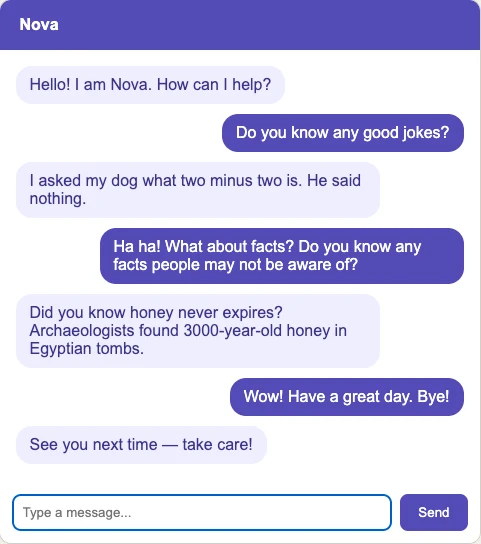
- A web interface with a chat window, message bubbles, and a text input — running in any browser
- A local server that connects the two, built with Flask
Every lesson ends with a working result you can test immediately. Nothing is left hanging until the next session.
What you will learn along the way
The course covers Python from the ground up — variables, conditionals, loops, lists, dictionaries, and functions. It also introduces HTML and CSS in the context of building the web interface, so you understand not just how to write the code but what every part of it actually does and why.
By the end you will have touched the core technologies that power most of the web: Python, Flask, HTML, CSS, and JavaScript. Not mastered — but used, understood, and ready to build on.
How long does it take?
Six lessons, around eight hours in total. The course is self-paced — work through it in a single weekend or spread it out over a few evenings. Every lesson is written to stand on its own, so you can pick up exactly where you left off.
Works on both Mac and Windows. No software to buy. No prior knowledge assumed.
Is this course for you?
This course is for anyone who wants to learn to code by building something real. It is for people who have tried other courses and found them too abstract. It is for people who are curious about how chatbots and AI tools actually work under the hood. And it is for anyone who wants a tangible, finished project they can show to someone else by the end of the weekend.
If you have never written a line of code, you are in exactly the right place.
By the end of this course you will be able to:
- Write and run Python programs from scratch
- Use variables, conditionals, loops, lists, and dictionaries
- Write reusable functions and organise your code cleanly
- Build a rule-based chatbot engine that matches keywords and returns responses
- Give your bot a name, a personality, and varied replies using Python's random module
- Add short-term memory so your bot remembers facts shared during a conversation
- Structure a web page using HTML
- Style a web interface using CSS
- Build and run a local web server using Flask
- Connect a Python backend to a browser frontend
- Explain how rule-based chatbots work and how they relate to modern AI systems
- Read and understand error messages and debug your own code
What's included:
- Full course material for building a working chatbot from scratch — six lessons covering Python, Flask, HTML, and CSS, from your very first program to a finished browser-based application
- Detailed breakdown of the HTML, CSS, and JavaScript — every part of the web interface explained line by line, so you understand exactly what you built and how it all fits together
- Access to the members blog — including posts written specifically for this course with tips, ideas, and next steps to keep building after you finish